MIDI · notes and chords
Ondas
Chord names, live.
Ondas reads the MIDI notes you play, names each chord and draws it as it happens: on keys, on a guitar chord box and on the staff, in hundreds of looks. Next builds chord progressions with you, suggests what could come next, and drags them into your session as MIDI.
What you can do
- Play a chord. Ondas names it.Live, from the MIDI you play.
- See it on guitar, next to your keysA chord box shows where the fingers go.
- And on the staffThe notes written out as you play.
- Hundreds of looksChange the whole style in a click.
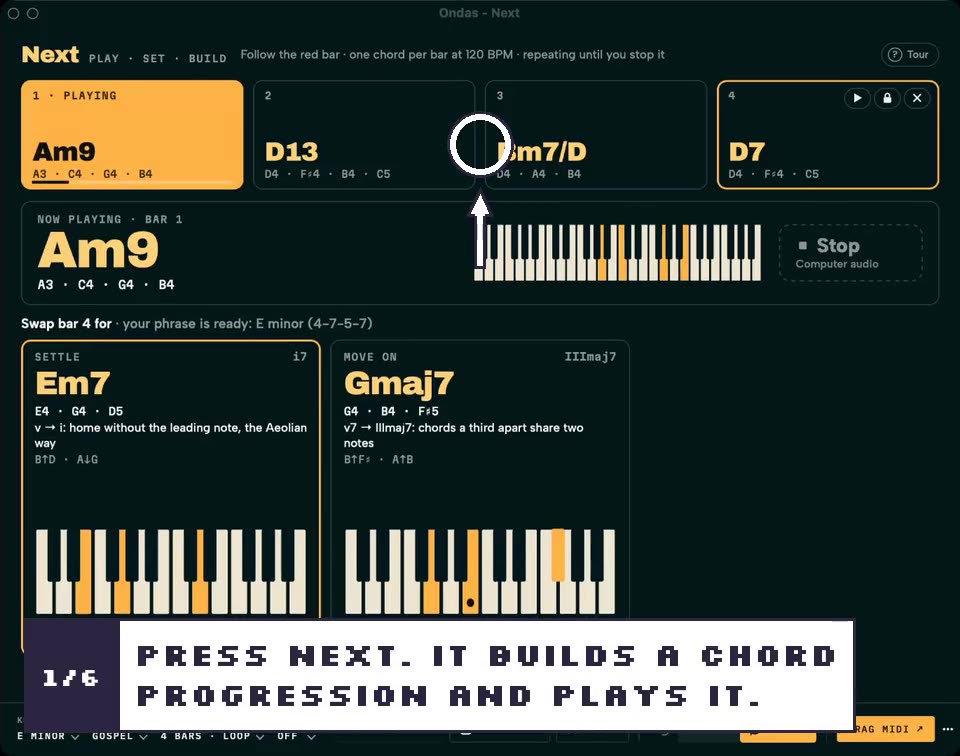
- Next builds a progression and plays itA full progression from one button; randomise for another.
- Stuck on a bar? Next suggests what comes nextHear a suggestion before it goes in.
- Play a chord and Set drops it inPlay along on your keys and let Next help with the rest.
- Drag the MIDI into your sessionThe progression lands on a track, ready to edit.
Start here
- Put Ondas on an instrument or MIDI track, after the instrument.
- Play a chord. Ondas names it and draws it.
- Not getting notes? Ondas shows a short guide for your music app, with a light that turns green when notes arrive. The steps for each app are below.
- Open Next to build a progression, then drag it into your session.
Getting notes to Ondas, app by app
- Ableton Live
- Live passes notes to Ondas through its helper, which the installer adds. Switch it on once: Settings › Tempo & MIDI › Control Surface › Ondas. Keep Ondas on a MIDI track, after the instrument.
- Logic Pro
- Use the MIDI FX slot: on the instrument's channel strip, click MIDI FX, then Audio Units › friends upstairs › Ondas. In an Audio FX slot, Ondas hears your MIDI keyboard only.
- GarageBand
- GarageBand doesn't pass a track's notes to plug-ins. Play your MIDI keyboard (Ondas hears it directly), or for a recorded part load its MIDI file with MIDI on Ondas's bar.
- FL Studio
- In Ondas's window, click the cog, then the plug-and-cog tab, and set MIDI Input port to 1. Add a MIDI Out channel on port 1 and put the notes there.
- REAPER
- REAPER passes the track's MIDI to Ondas. Put it after the instrument.
- Bitwig Studio
- Bitwig passes notes along the device chain. Put Ondas after the instrument. Nothing yet? Send notes from another track by setting its output to this track.
Cubase and Studio One: Ondas shows its own steps for them too; we haven't checked them yet.
Getting the video out
- Over your session: the Ondas window, for your screen recorder.
- Full screen: for a clean recording of the whole display.
- MIDI: drag a progression from Next into a track.
What it needs
- macOS
- 11 Big Sur or later.
- Mac
- Apple silicon or Intel.
- Formats
- Audio Unit (an effect, and Logic's MIDI FX slot) and VST3. The installer also adds the Ondas app, its presets and the helper for Ableton Live.
- Download
- 178 MB.
Good to know
- Ondas names common chords and many extended ones. An unusual voicing may get a name you'd write differently.
- In FL Studio and GarageBand, Ondas needs the one extra step above, and it shows you how when it opens.
More help: Help · This guide as a PDF · Version history · All four plug-ins